¶ Endpoints
Endpoints are used to manage settings for individual clients or devices. Endpoints can be used to store unique credentials or other specific settings for your devices. Endpoints are associated with a single service.
¶ Endpoint List
The endpoint list provides details about each of your defined endpoints.
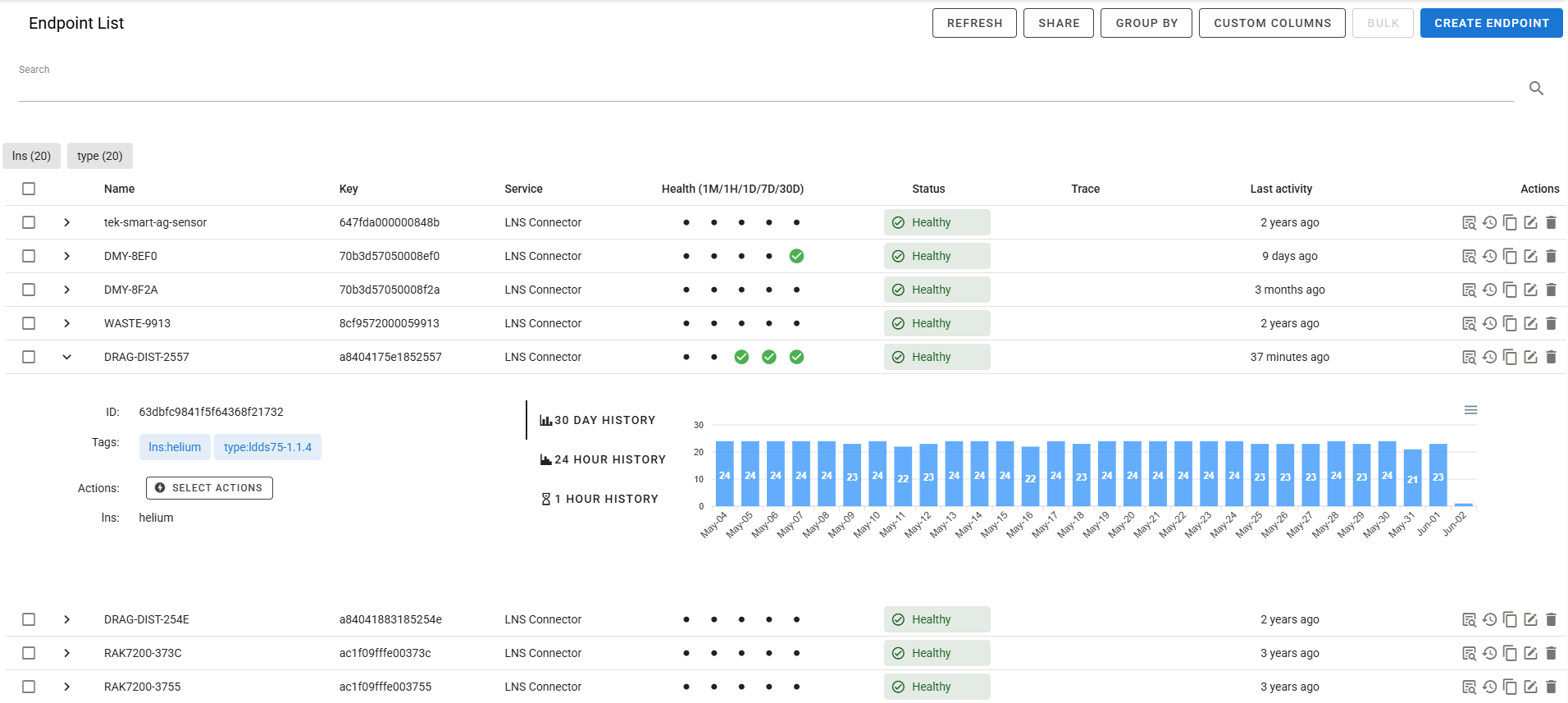
- Carat: Click the carat to expand more details about individual endpoints. Note that all charts show data from the past 30 days.
- Name: Name of the endpoint, used for display purposes only.
- Key: Key used to identify endpoint in triggers and other functions, the key must be unique within your account.
- Health: The Health column shows indicators based on the failures in the past 1, 7, and 30 days. <1% failure is green, 1%-50% is yellow, and >50% is red. This gives you a quick view on the health of your endpoints.
- Service: The service column shows which service the endpoint is associated with.
- Status: The Status column provides information about the current status of a endpoint.
- Trace: Indicates if trace is enabled on the endpoint.
- Last activity: The Last activity column shows when the endpoint last generated an event. Hover over the value to see the exact time.
- Actions: The actions column provides access to the logs for the specific endpoint, as well as the ability to edit or delete the endpoint. For LWM2M endpoints, you will also have an option to access the Object Browser if the device is currently connected.
¶ Endpoint Editor
The endpoint dialog is used to edit or create new endpoints.
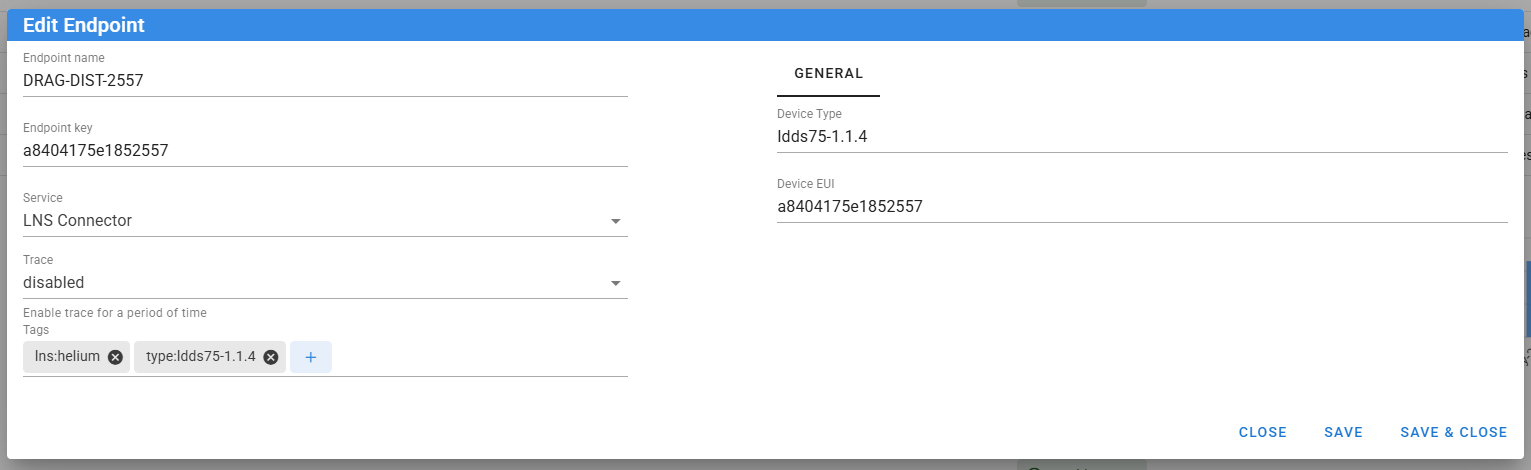
- Endpoint name: Name of the endpoint, this field is only used for display purposes.
- Endpoint key: A globally unique key (across all accounts) that identifies the endpoint, this key is commonly used in triggers to reference an instance of a specific endpoint.
- Service: The service associated with the endpoint.
- Time before declared missing: The time in seconds for a device to be in-active to be declared "missing". This is useful for devices that report in infrequently and are not always connected. When a device is declared missing, it will generate an Endpoint Lifecycle event.
- Trace: Trace enables enhanced logging and event metadata depending on the underlying service used.
- Blocked: Select Yes to block device ingestion or No to allow it. The endpoint status changes to
blockedonly when a connector actively rejects traffic or a connection. See Blocking device ingestion. - Tags: Tags allow you to organize and query for your endpoints.
- Parameters: The parameters will be different for each endpoint based on its service, please refer to the individual documentation for the service you are using for detailed information.
¶ Endpoint Storage
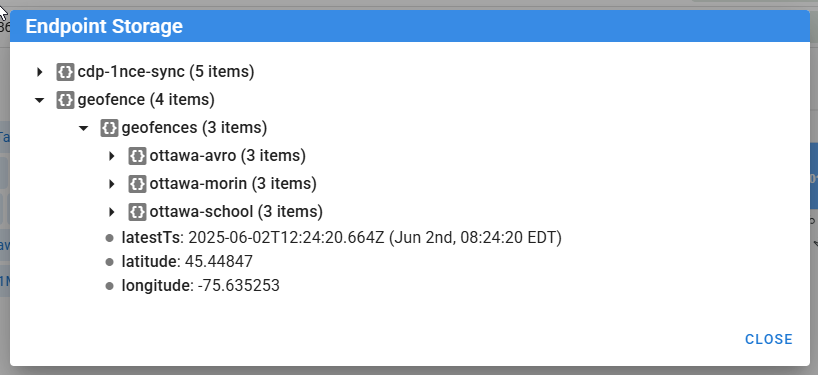
Endpoint storage is a useful sub-system that stores complex objects related to endpoints. Storage objects may be set by the system, or can be set by the user via triggers or the API.
¶ Sample Use-Cases
- Store state information about an endpoint to track long running operations such as FOTA, or configuration updates.
- Store "twin" information including parameters that may need to be written to devices when they check in.
¶ Important Notes
- While you can access system defined storage objects, you must take care to avoid corrupting data, as it may lead to unexpected behavior.
¶ Viewing from the user interface
The endpoint storage for an endpoint is visible by expanding the endpoint in the Endpoint List and clicking on the storage icon.
¶ Access from triggers
Endpoint storage can be viewed and stored via the endpoint.storageGet() and endpoint.storageSet() functions. For more information checkout the documentation.
var obj = endpoint.storageGet('myendpoint', 'data')
obj.temp = 26.2
endpoint.storageSet('myendpoint', 'data', obj)
¶ Trigger Events
¶ endpoint-lifecycle
Generated when an endpoint is automatically created or its status changes.
{
  "event": "healthy",
  "autogenerated": true
}
- event: New endpoint status, such as
new,healthy,error,connected,disconnected,unreachable,missing,blocked, orunknown. - autogenerated: Present and
truewhen the event was generated for a newly auto-created endpoint.
The event includes the endpoint and service metadata on the standard event object. A missing event is generated after the endpoint exceeds its configured Time before declared missing.
¶ Endpoint locations
Locations are optional. Each endpoint can retain one current observation per source, such as gps, network, or manual. Source keys start with a lowercase letter and contain only lowercase letters, numbers, underscores, or hyphens (up to 64 characters).
In the endpoint editor, use Locations → Add source to enter coordinates and optional Accuracy (meters). Accuracy records the estimated horizontal accuracy as a non-negative number; leave it blank when unknown. Remove an individual source or use Clear all locations. Manual edits receive the server's current timestamp; geohashes are calculated automatically. Saving unrelated endpoint settings preserves existing locations.
Expand an endpoint and select Map to see every source in a different color. The legend identifies each source, observation time, coordinates, accuracy when supplied, and geohash. Latest identifies the position used by the endpoint overview map. Accuracy is copied to the latest location but does not affect its selection. Select a source in the legend to focus its point, including sources sharing the same coordinates.
Endpoints → Map displays one position per endpoint: its newest remaining observation. Choose raw points, geohash clusters, or k-means clusters. Search uses endpoint fields, for example latestLocation.source=="gps". Tags and the visible map bounds filter both results and counts. Share preserves the filters, map mode, precision, limit, and bounds. A warning indicates limited results; k-means accepts up to 50,000 matching endpoints, after which you should narrow the viewport or use geohash.
Older observations cannot replace newer observations from the same source. The newest timestamp across all sources selects the overview position; equal timestamps across sources use ascending source-key order. Removing that source falls back to the newest remaining source. Removing every source removes the endpoint from maps. After removal or clearing, a later write can restore a source even if its observation timestamp predates the removal.
Timestamp comparisons and latest-location selection use the endpoint loaded for the update. Writes target individual sources, preserving other sources in storage. Concurrent updates may overwrite newer data for the same source or leave the overview position out of date until a subsequent location change recalculates it from a freshly loaded endpoint.
Locations are current runtime observations, not history. They do not expire automatically or affect endpoint health/activity. Configuration exports, imports, and endpoint duplication omit locations. Existing Track history, tracked values, addresses, and Track maps continue to operate separately; Track data is not automatically copied to endpoints.
¶ Blocking device ingestion
Set Blocked to Yes in the endpoint editor to reject device ingestion. Select No to allow ingestion again. Missing or null values display as No. The bulk editor offers No change, Block, and Unblock; it defaults to No change each time it opens.
The endpoint blocked field is optional. Only true blocks ingestion; false, null, and an absent field are unblocked. Individual REST create/update requests and trigger updates accept booleans or null. Omitting the field from an update preserves its value; null clears it. Bulk REST updates use true/false to block/unblock, with omitted or null meaning no change.
endpoint.update(event.endpoint.key, { blocked: true });
endpoint.update(event.endpoint.key, { blocked: false });
endpoint.update(event.endpoint.key, { blocked: null });
The REST update body is the same, for example {"blocked": true}. Trigger endpoint snapshots expose event.endpoint.blocked and refresh it after endpoint.update.
Blocked UDP packets are dropped; TCP connections close when the endpoint is identified. CoAP application requests receive 4.03 Forbidden, and keepalives are ignored. MQTT connections are refused as Not authorized, and existing publish/subscription processing disconnects the device when its endpoint lookup sees the flag. LwM2M bootstrap, registration, and registration updates receive 4.01 Unauthorized; incoming notifications, Send data, and queued results are suppressed. DTLS authentication also fails when its endpoint lookup identifies a blocked endpoint.
Blocking takes effect when a connector looks up the endpoint, using its current cache timing. It does not proactively disconnect devices or add polling. A TCP connection configured to identify its endpoint only on its first message may continue until it reconnects. LwM2M registration updates check the stored endpoint before acceptance; notifications and Send use a five-second endpoint cache, refreshed on the next lookup after expiry. A failed cache refresh can temporarily retain the previous value. Notification and Send callbacks can suppress platform ingestion after the protocol library has already acknowledged an exchange. The endpoint remains available for administrative reads and edits, including unblocking.
The Blocked status records an actual runtime rejection. Setting or clearing the blocked flag does not change status by itself. When a protocol handler enforces the flag, it sets status to blocked; subsequent accepted traffic can update status normally after unblocking. Blocked status is excluded from missing-device detection.